
Lec 2. Virtual Memory
Review From Intro. Sys (计算机系统概论)
Two views of memory
From CPU: what program sees, virtual memory
From memory: physical memory
Translation box (MMU) converts between them
protection (access control between processes)
Every program can be linked/loaded into same region of user address space
Memory translation
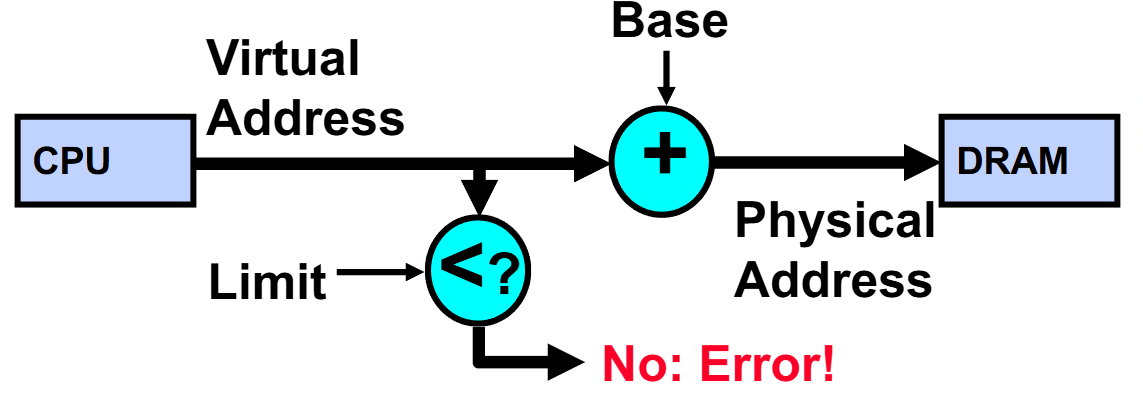
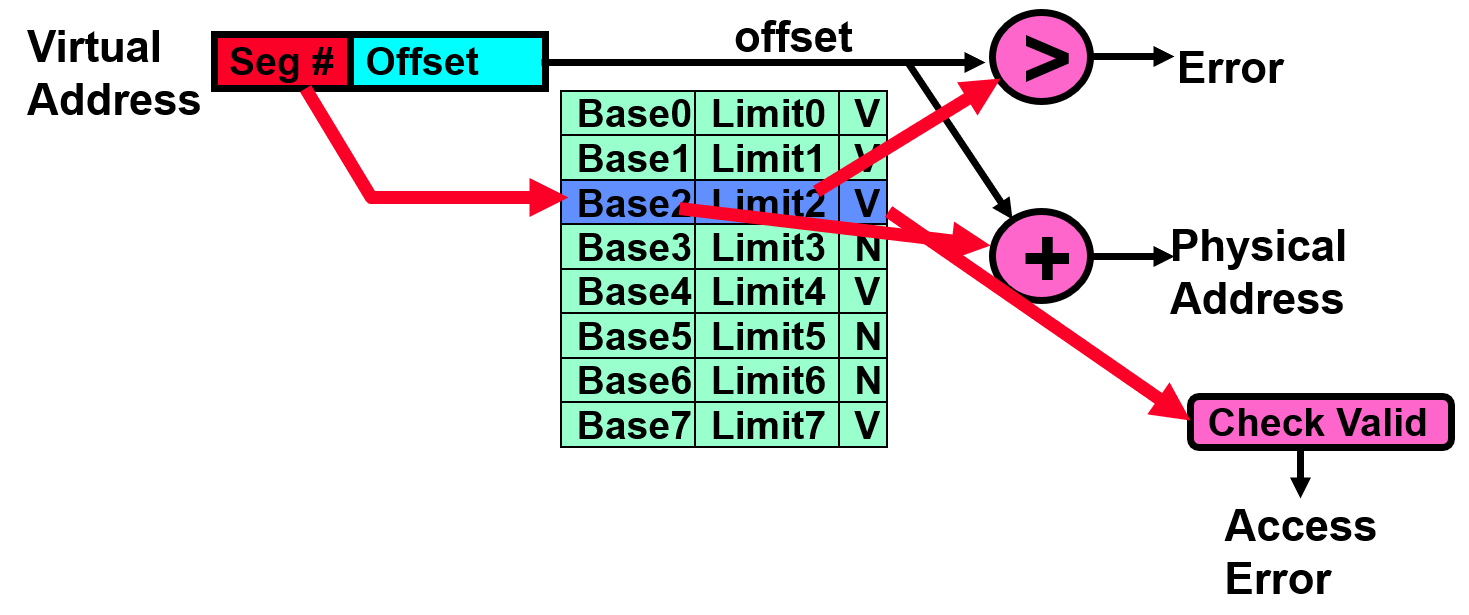
Simple Base and Bounds (CRAY-1)
Advantages
Simple, fast
Giving program the illusion that it is running on its own dedicated machine, with memory starting at 0. Program gets continuous region of memory.
Issues
Fragmentation
Not every process is the same size
Over time, memory space becomes fragmented
Inter-process sharing is difficult
Paging
Physical memory in fixed size chunks (pages)
Equivalent physical size: use vector of bits to handle allocation
No need to as big as previous segments, otherwise lead to internal fragmentation
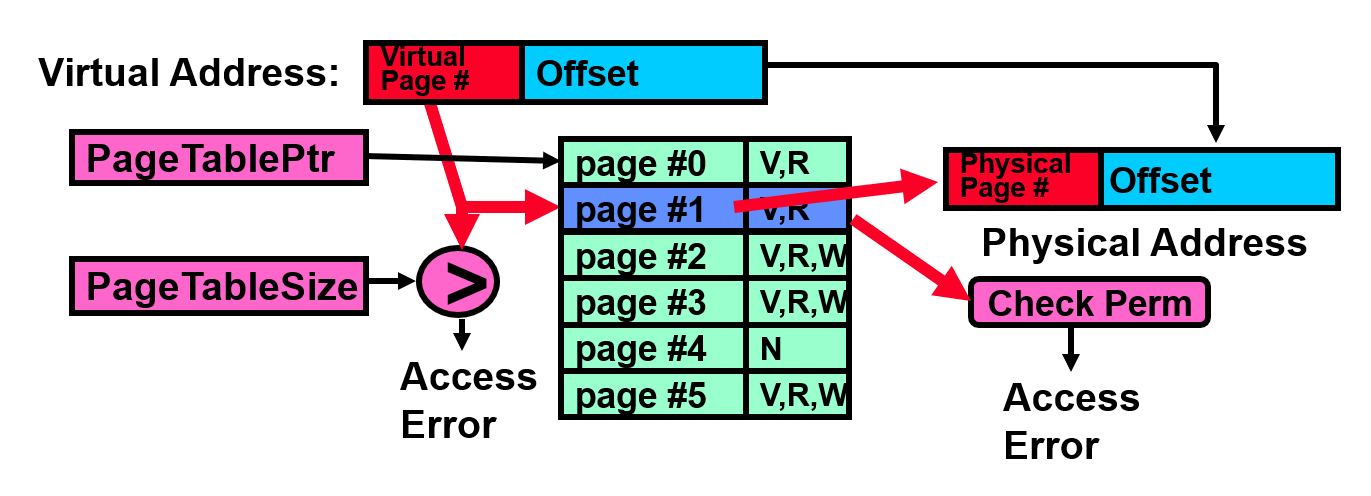
Page table
One per process
Resides in physical memory
Contains physical page numbers and permissions
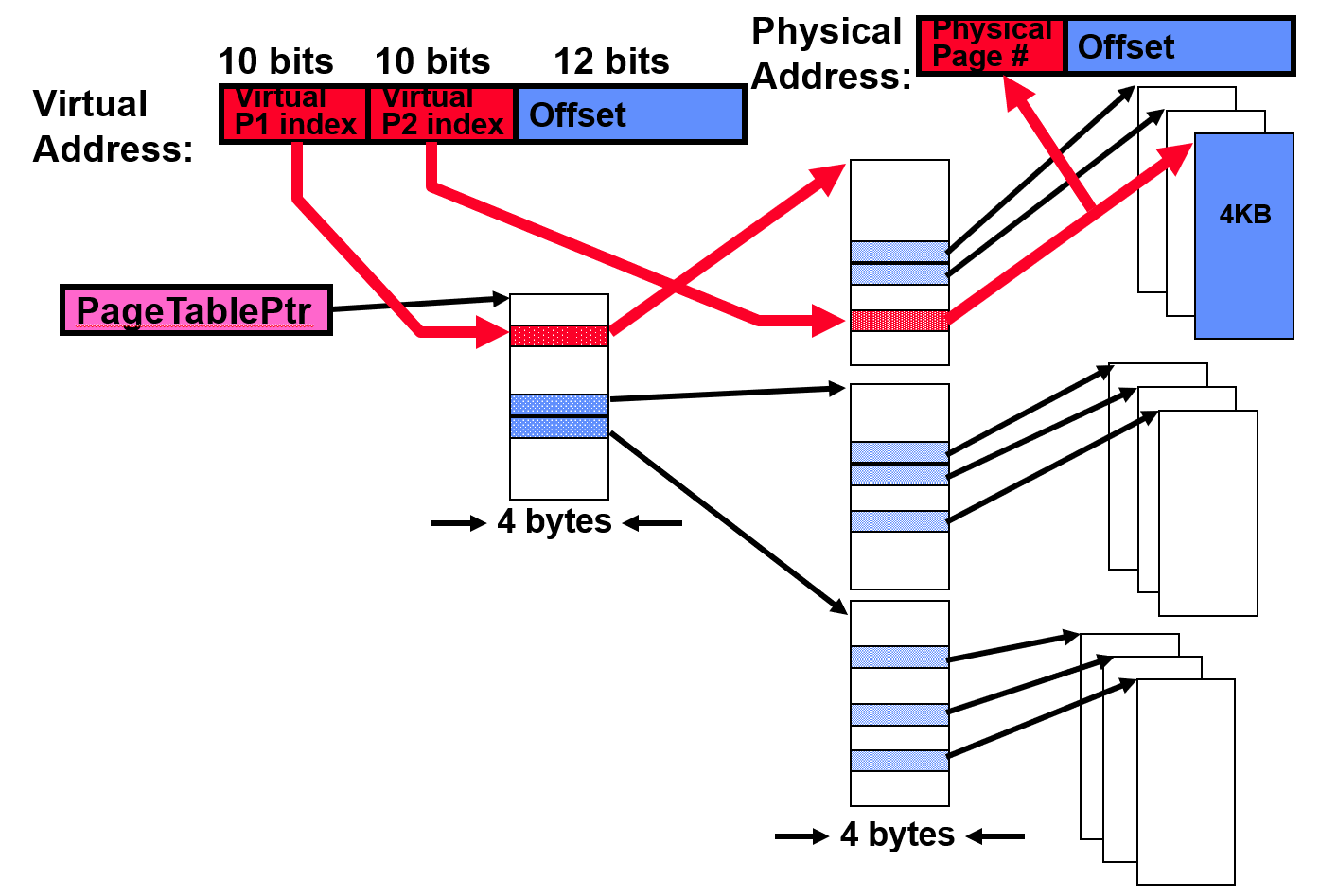
Two level page table
Tree of page tables
Tables fixed size (on context switch just need to save single
PageTablePtrregister)Valid bits on PTEs: don't need every 2nd-level table, even when exist, they can reside on disk if not in use.
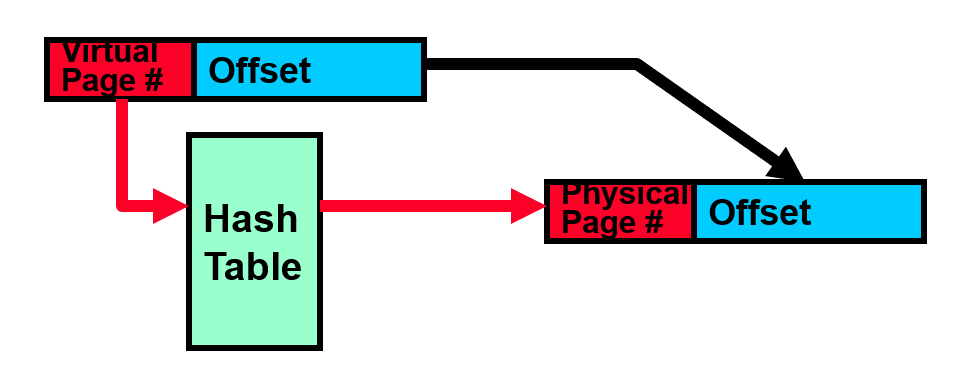
Inverted page table
Use a hash table
Size is independent of virtual address space
Directly related to amount of physical memory
Cons: complex to manage hash changes, often in hardware
Address Translation Comparison
| Translation Method | Advantages | Disadvantages |
|---|---|---|
| Segmentation | Fast context switching: Segment mapping maintained by CPU | External fragmentation |
| Paging (single-level page) | No external fragmentation, fast easy allocation | Large table size ~ virtual memory |
| Two-level pages | Table size ~ # of pages in virtual memory, fast easy allocation | Multiple memory references per page access |
| Inverted Table | Table size ~ # of pages in physical memory | Hash function more complex |
Caching principles
Cache
where .
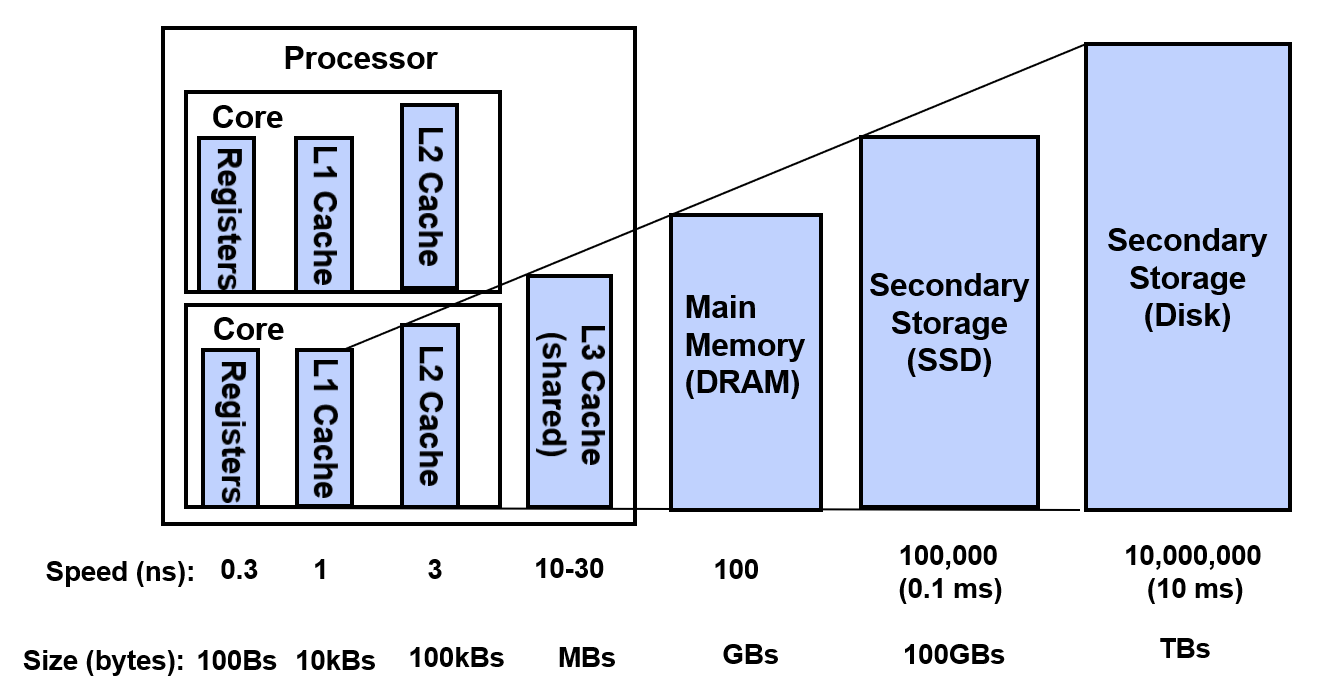
Memory Hierarchy
More memory from cheapest technology
Access at speed from fastest technology
Locality
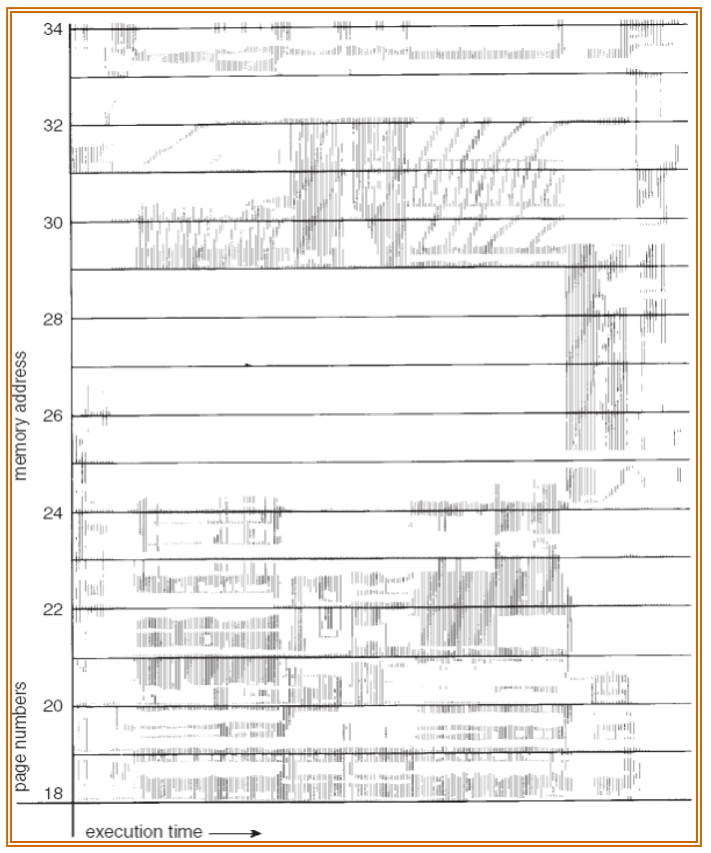
Temporal locality: recently accessed items likely to be accessed again
Spatial locality: items with nearby addresses likely to be accessed soon
Working Set: group of pages accessed along a given time slice, which defines minimum number of pages needed for well performance
Questions: block size, how to organize the cache, how to find the block, what happens on a miss, which to evict, what happens on a write...
- Focus on Hit Rate, Hit Time and Correctness
VM Policy
Demand paging
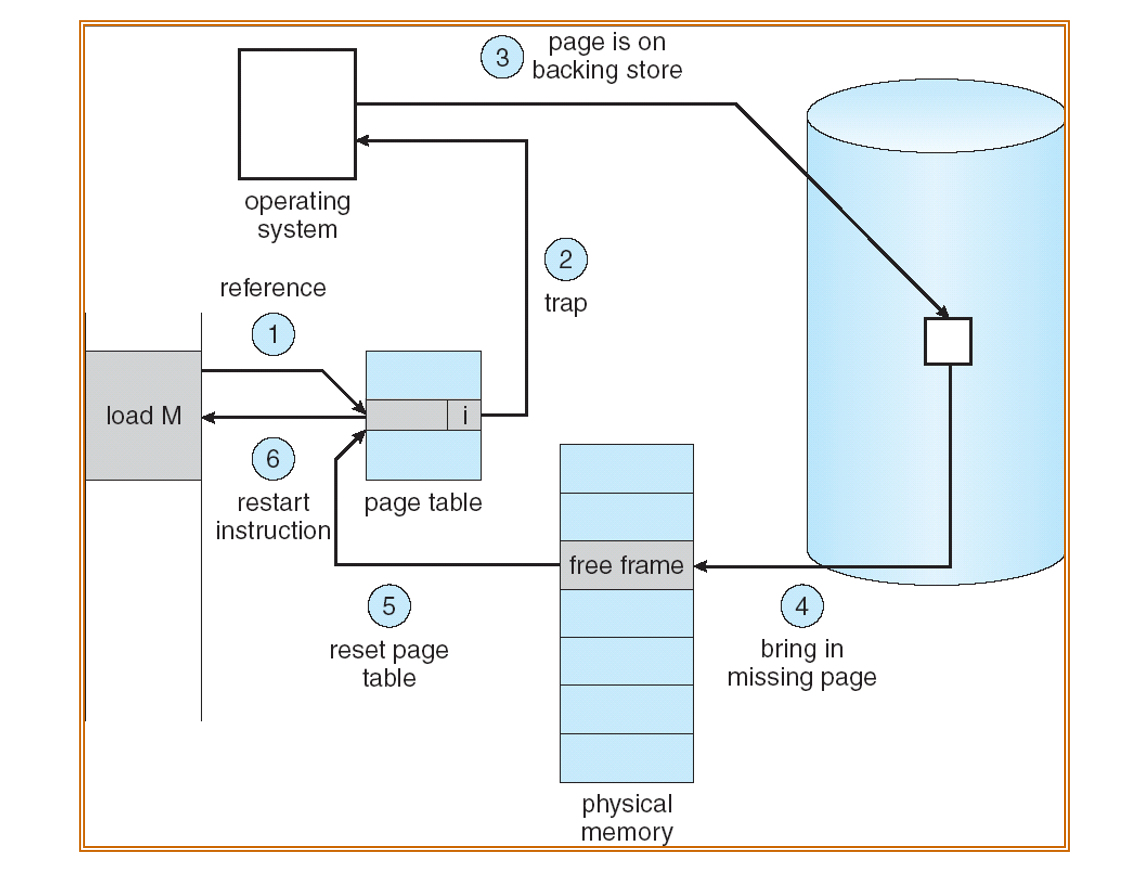
Demand paging is caching. PTE helps us to implement
Valid bit: whether page is in memory
User references page with invalid PTE?
Page fault! But what does OS do?
Choose an old page to replace
If modified, write it back to disk
Load new page into memory from disk
Update PTE, invalidate TLB for new entry
Continue thread from faulting instruction
Caching effectiveness calculation
Memory access time = 200 ns
Average page-fault service time = 8 ms
Probability of miss is
EAT (Effective Access Time)
If one access out of 1,000 is a miss, then slowdown by a factor of 40!
If want slowdown by less than 10%, then need less than 1 page fault per 400,000 accesses!
What factors lead to misses?
Compulsory misses: first access to a page
- Can be reduced by prefetching
Capacity misses: not enough memory
- Increase amount of DRAM or adjust percentage of memory allocated to each process
Conflict misses: not exist because VM is fully associative
Policy misses: pages were in memory but kicked out by replacement policy
- Better replacement policy
Replacement policies
Policies
FIFO (First In First Out)
- Fair but bad, because throw out heavily used pages
LRU (Least Recently Used)
- Good but expensive to implement
MIN (Minimum)
- Optimal but unrealizable, because need to know future
RANDOM
Typical solution for TLB.
Simple but unpredictable
FIFO
Implement with a queue
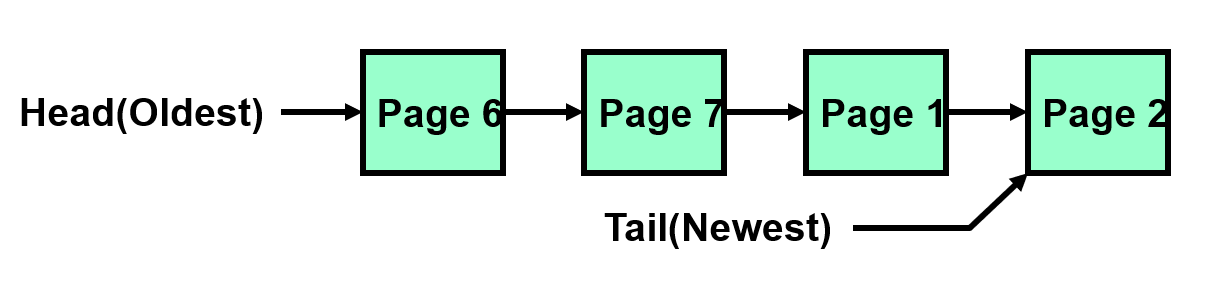
Compared to MIN
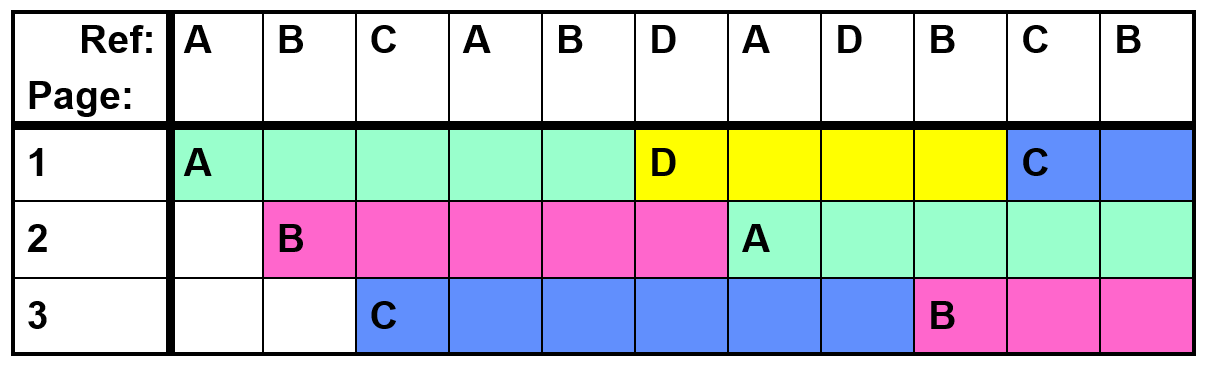
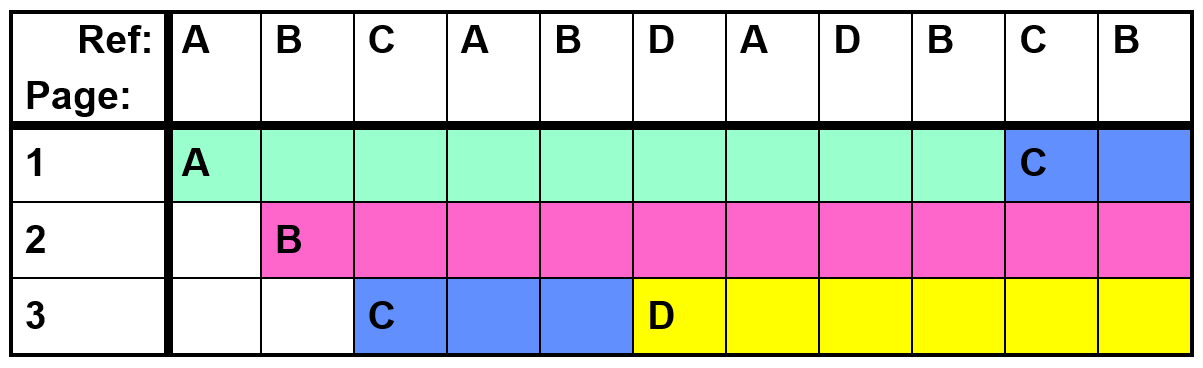
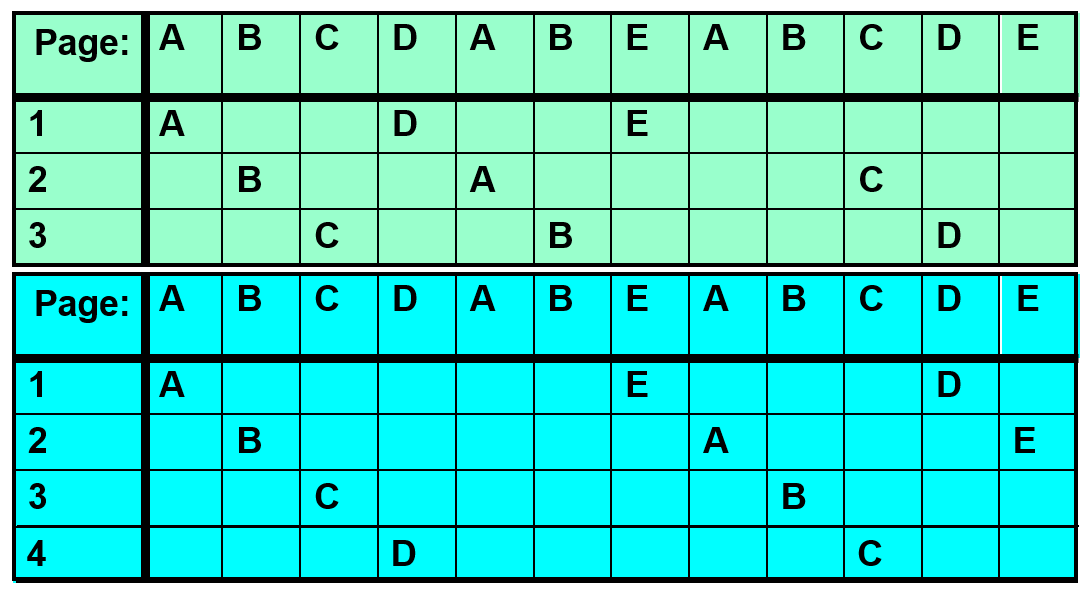
Belady's Anomaly: more frames may lead to more page faults
LRU (Least Recently Used)
Implement
LRU page is at head
A page is used for the first time: add to tail
- Eject head if list longer than capacity
A page is used again: move to tail
Problems
Updates are happening on page use, not just swapping
List structure requires extra pointers c.f. FIFO, more updates
Compared to MIN
In the example above, LRU is same as MIN
But sometimes LRU perform badly
(only 4 page faults for MIN in this case)
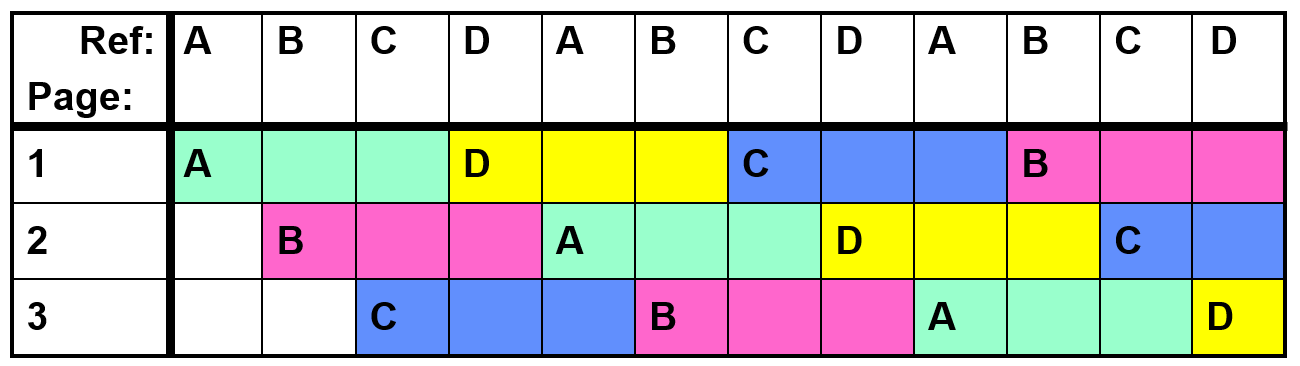
No Belady's Anomaly for LRU
Approximating LRU
Second Chance Algorithm
FIFO with "use" bit
Replace an old page, not the oldest one
Details
A "use" bit per physical page, set when accessed
On page fault, check oldest page (head)
If use bit is 0, replace it
If use bit is 1, clear it, put page at tail (give second chance), check next oldest page
Move pages to tail still complex
Clock Algorithm
More efficient implementation of second chance algorithm
Details
Arrange physical pages in circle with single clock hand
On page fault, check page at clock hand
If use bit is 0, selected candidate for replacement
If use bit is 1, clear and leave it alone
Advance clock hand (not real time)
The hand moving slowly is a good sign (not many page faults or find page quickly)
-th chance algorithm: clock hand has to sweep by times without page being used before page is replaced
Large means better approx to LRU
Small means more efficient
For dirty pages, can give more chances because write back to disk is expensive
- Common approach: clean pages , dirty pages
Useful bits of a PTE entry
Use, Modified, Valid, Read-only
Generally modified / use bits can be emulated by software using read-only / invalid bits
Thrashing
Process is busy swapping pages in and out
Low CPU utilization
Reducing Compulsory Misses
Clustering: bring in multiple pages around the faulting page (may evict other in-use pages)
Working Set Tracking: use algorithm to try to track working set of application, when swapping process back in, swap in the whole working set
File System Buffer Cache
Cache data in memory to exploit locality
Name translations: Mapping from paths inodes
Disk blocks: Mapping from block address disk content
Buffer cache
Memory used to cache kernel resources, including disk blocks and name translations
Implemented entirely in OS software
Caching policy
Replacement policy: LRU
Advantages: good hit rate (when memory is sufficient)
Disadvantages: fails when application scans through file system, flushing the cache
Other policy: some systems allow applications to request other policies, e.g. "Use Once"
Cache size: buffer cache vs virtual memory
Tradeoff: running more applications at once vs better performance for each application
Solution: adjust boundary dynamically, so that disk access rates for paging and file access are balanced
Read ahead prefetching: fetch sequential blocks early
Most common file access is sequential
Interleave groups of prefetches from concurrent applications (elevator algorithm)
Too many prefetch: imposes delays on requests by other applications
Too few prefetch: many seeks among concurrent file requests
Delayed writes: writes to files not immediately sent out to disk
write()copies data from user space buffer to kernel buffer (in cache)Flushed to disk periodically (UNIX: 30s)
Advantages: efficiently order lots of requests. Some files may never need to be written to disk (e.g. temporary files)
Disadvantages: lost data if crash before flush. Worst case is to lose the directory entry
Buffer Caching vs Demand Paging
Replacement policy: LRU is OK for buffer cache, but infeasible for VM (use approximation)
Eviction policy
Demand paging: evict not-recently-used pages when memory is close to full
Buffer cache: write back periodically, even if used recently (to minimize data loss in case of a crash)